Mini Militia Old Versions: Download, Classic Versions, Multiplayer and Version History
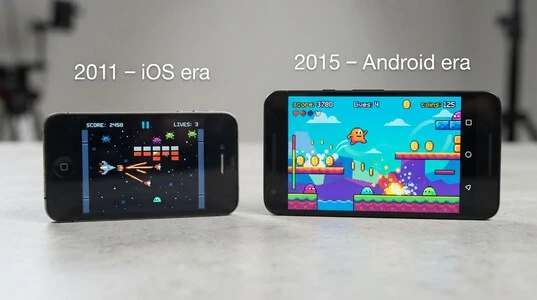
Mini Militia Old Versions refers to earlier releases of Doodle Army 2: Mini Militia that players still seek for classic gameplay, older features, local multiplayer, older-device compatibility, or nostalgia. The game first released on iPhone and iPad in 2011, while the Android version followed in 2015.
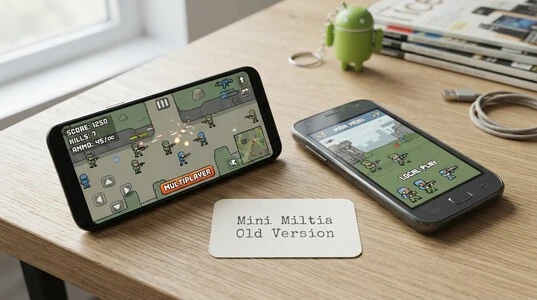
Older releases are especially remembered for their local Wi-Fi/LAN multiplayer experience, which made it easy for friends to play together on the same network. However, a historical APK is not the same as Mini Militia Classic. The current Classic release is a separate version from Appsomniacs that specifically brings back Wi-Fi LAN modes and other elements associated with the original game. Old APKs can also have installation and compatibility limitations on newer Android devices, so an older release may not work simply because its files are available. This guide covers the major Mini Militia old versions, their version history, multiplayer features, offline play, Classic edition, and compatibility considerations.
Mini Militia Old Version Download: What You Should Know First
Before searching for a Mini Militia Old Versions download, identify exactly what type of file you need. An original historical release is an older build of Doodle Army 2: Mini Militia preserved by an archive or distribution site. A third-party archived APK may be a genuine older build, but the archive itself is not the original developer. By contrast, a MOD APK has been modified and may advertise features such as a mini militia old version mod menu or Mini Militia Old Versions all unlocked. Simply being an old APK does not make it a MOD.
For a mini militia doodle army old version, check the version number, developer/package information, Android requirement, architecture, and file type before installing. Established APK archives can provide technical details such as supported Android versions and CPU architecture, while third-party sites may make additional claims that are harder to independently verify.
Why Version Number Matters
The version number matters because builds can differ in features, multiplayer behavior, Android compatibility, and file architecture. Some archives list separate ARM variants, for example, so the correct file can depend on the device.
Mini Militia Old Versions — Complete Version History
The Mini Militia Old Versions timeline spans more than a decade, but the year alone does not always identify a specific APK. The clearest historical point is that Doodle Army 2: Mini Militia launched on iOS on April 5, 2011, while the Android release arrived in March 2015. Later Android builds moved through the 4.x and 5.x series, with archived records confirming releases such as 4.2.8 in 2019 and several 5.x builds in 2020.
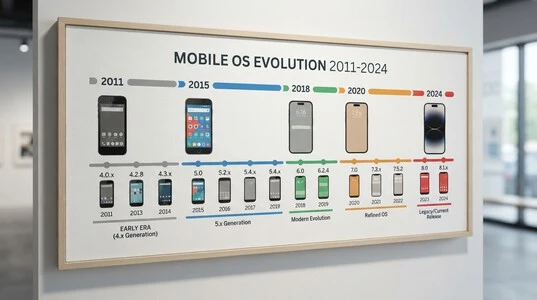
Version / Era | Historical context |
2011 | Original iOS release period. This is the proper context for mini militia old version 2011; it should not be treated as proof of an official Android APK from 2011. |
2015 | Android era begins. The Android release in March 2015 explains why mini militia old version 2015 is commonly associated with the game’s early Android history. |
2016 | An important early Android period associated with the game’s growing multiplayer popularity and legacy gameplay. |
2017 | Part of the period commonly remembered for the classic Mini Militia experience, particularly local multiplayer. Specific APK builds should be identified by version number rather than year alone. |
2018 | Later legacy development. The App Store history records version 4.1.2 in June 2018, including changes to Practice/Local and online custom games. |
2019 | The 4.x era continued. Version 4.2.8 is documented as a January 2019 release in Apple’s version history and as a September 2019 Android archive entry, showing why dates can differ by platform or archive. |
2020 | The game moved further through the 5.x series. Archived records list 5.0.6, 5.2.0, 5.2.1, 5.3.1, 5.3.2 and 5.3.4 during 2020. |
2.2.23 | A specific older build searched for by players. Treat the exact build number as more useful than assigning it to a year without a reliable release record. |
3.0.47 | Another historical version identifier; availability in third-party archives does not by itself establish every feature or release date. |
4.0.1 | Early 4.x build and a useful identifier when comparing legacy releases. |
4.0.11 | Another 4.0-series release; the exact APK should be verified by its build metadata. |
4.0.42 | A later 4.0-series build often referenced in old-version searches. |
4.2.8 | A documented 4.x release from 2019. |
4.3.2 | The App Store records this version on August 14, 2019, with matchmaking changes, Team Deathmatch, new maps and weapons. |
4.3.3 | A later 4.3-series build; verify the platform and archive before treating third-party feature claims as authoritative. |
4.3.5 | Another 4.3-series reference used in old-version searches; the exact build should be checked against its source metadata. |
5.6.0 | A later legacy reference rather than an early classic build. Current archives list 5.6.0, while Apple’s history records 5.6.0 in September 2024. |
Mini Militia Old Version 2011
The mini militia old version 2011 label needs an important clarification: 2011 refers to the original iPhone and iPad release period. MobyGames records the initial release on April 5, 2011, while its Android release record begins in March 2015. Therefore, claims about an official Android APK from 2011 should be treated cautiously.
Mini Militia Old Version 2015
The mini militia old version 2015 era marks the beginning of Android availability. MobyGames records the initial Google Play release in March 2015, making 2015 the key starting point for the Android side of the game’s old-version history.
Mini Militia Old Version 2016
The mini militia old version 2016 period belongs to the early Android era, when the game’s multiplayer-focused identity was already established. For downloads, however, a specific build number is more reliable than simply searching for a “2016 APK.”
Mini Militia Old Version 2017
The mini militia old version 2017 label generally points to the classic-era Android experience remembered by longtime players. Because multiple builds could exist within one year, version numbers should be used when trying to reproduce a particular gameplay or multiplayer setup.
Mini Militia Old Version 2018
The mini militia old version 2018 period includes the 4.x generation. Apple’s documented 4.1.2 update from June 2018 shows changes to local practice and online custom-game organization, demonstrating that the game was still receiving meaningful gameplay and connectivity updates.
Mini Militia Old Version 2019
The mini militia old version 2019 era includes 4.2.8 and 4.3.x releases. Apple’s version history records 4.2.8 and 4.3.2 during 2019, including matchmaking, Team Deathmatch, maps, weapons and other gameplay changes.
Mini Militia Old Version 2020
The mini militia old version 2020 period moved deeper into the 5.x generation. Archive records list several 2020 builds, while Apple’s history shows substantial additions such as Battle Pass features in 5.3.2 and 5.3.3 and later friend functionality in 5.3.4.
Note: Dates and version labels can differ between iOS, Android, and third-party archives. Where an archive provides a file but the original release record is unclear, the version number is safer to report than an unverified date or feature claim.
Mini Militia Old Version 2.2.23, 3.0.47, 4.0.1 and 4.x Versions
Specific version numbers are more useful than year labels when you want to reproduce a particular Mini Militia Old Versions. However, archival records do not consistently document every historical build, so unsupported release dates or feature claims should be treated cautiously.
Mini Militia Old Version 2.2.23
Mini Militia old version 2.2.23 belongs to the older legacy-version search cluster. Players may look for it to recreate an earlier gameplay experience or test compatibility with older Android hardware. Because reliable public records for this exact build are limited, its release date and feature set should not be presented as confirmed without a primary source.
Mini Militia Old Version 3.0.47
Mini Militia old version 3.0.47 is another historical build sought by players interested in legacy gameplay and multiplayer. The broader 3.0 generation was still receiving updates in 2017; Apple’s official history, for example, records 3.0.75, 3.0.85, 3.0.135 and 3.0.155 that year.
Mini Militia Old Version 4.0.1
The mini militia old version 4.0.1 search points to the 4.x generation, which introduced and refined several features over successive builds. Compatibility depends on the device and Android version, so an old APK that once worked on an older phone may not install or behave identically today.
Mini Militia Old Version 4.0.11
The mini militia old version 4.0.11 is documented in third-party archives as an early 2018 build. Such archive metadata is useful for identifying a file, but should not be treated as equivalent to an official release record.
Mini Militia Old Version 4.0.42
The mini militia old version 4.0.42 is particularly associated with the LAN-focused legacy era in community and third-party discussions. One publicly available project specifically chose 4.0.42 because its author associated newer versions with the removal of LAN mode. That is community evidence, not an official feature statement, so it should not be treated as definitive on its own.
Mini Militia Old Version 4.2.8
The mini militia old version 4.2.8 is easier to verify: Apple’s version history lists it on January 10, 2019, with bug fixes, while Android archives also preserve a 4.2.8 APK. The differing archive dates demonstrate why platform-specific metadata should be checked before assigning an exact historical date.
Mini Militia Old Version 4.3.2, 4.3.3 and 4.3.5
4.3.x Version Family
The mini militia old version 4.3.2 has a documented August 14, 2019 release on iOS and introduced Team Deathmatch, matchmaking changes, a tutorial, new avatars, maps and weapons. The mini militia old version 4.3.3 and 4.3.5 are later members of the same 4.3 family, but publicly available archives do not provide equally strong primary-source documentation for every individual change. Android archives list 4.3.5 as a November 2019 build.
Mini Militia Old Version 5.6.0
The mini militia old version 5.6.0 is a much later legacy reference and should not be confused with the early classic releases. Apple’s official version history dates 5.6.0 to September 11, 2024 and lists the addition of in-game Friends and related fixes.
Important: Exact version dates, file sizes, and APK metadata can differ between platforms and third-party archives. Where those sources disagree, the safest approach is to identify the build by its version number and avoid presenting uncertain archival details as official facts.
Mini Militia Old Version Offline: Can You Still Play Without Internet?
Yes, but Mini Militia Old Versions offline can mean different things. Offline single-player play does not require an internet connection, while local multiplayer can work through the same Wi-Fi network without using the internet. In other words, two phones can be connected to the same local network even when that network has no internet access.
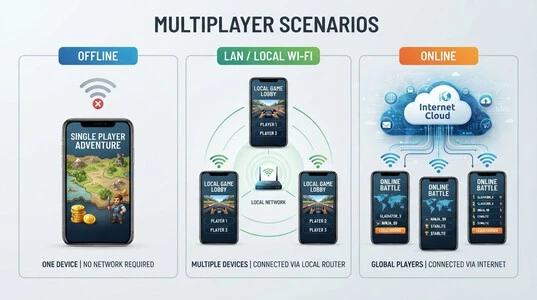
This distinction matters because “offline multiplayer” is often actually LAN multiplayer. The players still need a compatible local connection and, depending on the release, compatible game versions. Historical online multiplayer is different: an old APK does not guarantee that its original servers or online services are still available.
Mode | Internet required? |
Single player / training | Depends on version |
LAN / local Wi-Fi | Usually no |
Online multiplayer | Yes |
Historical online services | Not guaranteed |
The distinction is also visible in the current Mini Militia Classic listing, which separately identifies offline Training, Co-op and Survival modes and local Wi-Fi multiplayer. The older iOS version history likewise distinguishes LAN/SOLO games from online play.
Mini Militia Old Version Multiplayer: LAN, Wi-Fi and Online Play
Mini Militia Old Versions multiplayer is often associated with local Wi-Fi or LAN matches, where friends could connect their phones on the same network and play together. The important requirement was not necessarily internet access, but a compatible local network and compatible game builds. If players cannot see a lobby, common causes include being on different Wi-Fi networks, network isolation on a router or hotspot, or incompatible versions. Community reports also describe version mismatches preventing players from joining the same hosted game.
LAN and Local Multiplayer
For local play, all devices should normally be connected to the same Wi-Fi or local network. A phone hotspot can sometimes work, but network settings may prevent devices from discovering one another. Version differences can also matter: an older client may not be able to join a lobby hosted by a newer build. Community reports specifically describe this issue with the 4.x era, although such reports should be treated as user experience rather than official compatibility documentation.

Mini Militia Old Version Online Play
Mini Militia Old Versions online play is a separate issue from LAN. An old APK launching successfully does not mean its historical online infrastructure is still available. Servers, authentication systems, matchmaking and other backend services can change or disappear independently of the APK. For a currently supported option, Mini Militia Classic officially advertises both online multiplayer for up to six players and local Wi-Fi multiplayer for up to 12 players.
Why Different Versions May Not Play Together
Can different Mini Militia versions play multiplayer together? Usually, you should not assume they can. Different version numbers or builds may use incompatible multiplayer protocols, while separate network configurations can also prevent lobby discovery. For reliable LAN play, using the same game version on every device removes one major source of incompatibility.
Mini Militia Old Versions iOS: What About iPhone and iPad?
The Mini Militia Old Versions ios search is separate from Android because iPhone and iPad use Apple’s app ecosystem rather than Android APK files. An Android APK cannot be installed directly on an iPhone or iPad. Older iOS releases are a separate preservation issue, usually involving App Store history or an IPA package rather than an APK.
Mini Militia 2011 and iOS
The mini militia old version 2011 label is especially important on iOS. The original Doodle Army 2: Mini Militia release dates to the 2011 iOS era; it should not be interpreted as evidence that an official Android version existed in 2011. Android arrived later, so the two platforms have separate version histories.
Old iOS Version vs Current App
Today, the official App Store listing is for the current Mini Militia – Doodle Army 2 release from Miniclip. It supports iPhone and iPad but requires iOS 12 or later, which means older devices or older operating systems may face compatibility limits. The current listing also describes online multiplayer for up to six players and an offline Survival mode.
This is why someone searching for the old iOS LAN experience may not get the same game simply by installing the current App Store version. Historical iOS builds, their features, and their compatibility are separate from the currently distributed app.
Mini Militia Classic Old Version vs Original Old Versions
The mini militia classic old version search can cause confusion because Mini Militia Classic is not simply an old APK. A historical APK is an earlier software build preserved from the game’s past. Mini Militia Classic is a separate, modern release that Appsomniacs says it relaunched under original management, with Wi-Fi LAN play restored. It continues to receive updates rather than remaining frozen at a historical version.
Is Mini Militia Classic the Same as an Old APK?
No. A historical APK represents a particular point in the original game’s version history. Mini Militia Classic has its own release history and is distributed as a current app through official stores. Appsomniacs describes it as a “spiritual rebirth” of the original DA2 and says removed elements such as LAN were brought back.
Old APK vs Mini Militia Classic
Feature | Historical Old Version |
Type | Legacy build |
Era | Historical |
LAN | Version-dependent |
Modern phone compatibility | May be problematic |
Updates | Historical/frozen |
Online features | Version/service dependent |
Source | Often third-party archive |
Why People Looking for the Old Game May Prefer Classic
The choice depends on the goal. Someone researching historical accuracy may specifically want an original old build. Someone seeking the classic-style experience on a modern device may instead consider Mini Militia Classic, which officially supports local Wi-Fi multiplayer and online play. The current listing also includes offline Training, Co-op and Survival modes.
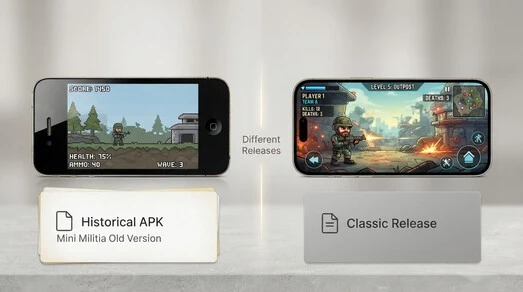
So, an old APK and Classic should be treated as two different ways of accessing the Mini Militia experience, rather than interchangeable names for the same release.
Mini Militia Old Versions for Android 15: Compatibility & Installation
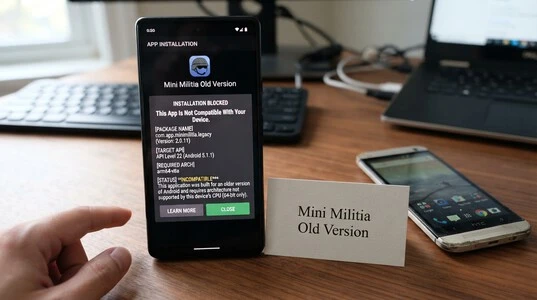
The Mini Militia Old Versions for android 15 search comes with an important limitation: an APK that worked years ago may no longer install on a modern device. Android 15 blocks installation of apps targeting an API level below 24, a security change documented by Google. Other problems can include an incompatible APK architecture, package-signature conflicts, unsupported APK formats, or an existing installation using the same package name.
Why Old APKs May Not Install on New Android
An old Mini Militia APK was built for the Android environment available at the time. Modern Android can impose different installation and security requirements. Android 15 specifically raises the minimum installable target API to 24, so particularly old builds can fail before the game even opens. Even when installation succeeds, older software may still have runtime or compatibility problems.
What If You Are Using Android 15?
Before installing a historical build, check:
- Exact version: Confirm the APK is the intended release.
- Architecture: Make sure the package matches the device’s supported architecture.
- Android compatibility: Check its target/minimum API requirements.
- Package source: Avoid mixing modified packages with an original installation.
- Existing data: Back up relevant game data before replacing an installation.
- Alternative: If the goal is classic gameplay rather than historical preservation, consider the officially distributed Mini Militia Classic, which is maintained separately and advertises Wi-Fi LAN play.
Why a Version That Worked in 2017 May Not Work Today
Why won’t my old Mini Militia APK install on Android 15? The APK may target an API level that Android 15 no longer accepts, or it may have other package or compatibility differences. Android 15’s documented minimum target requirement alone can prevent installation of sufficiently old applications.
Mini Militia Old Version Pink, Pro Pack, Mod Menu and All Unlocked
Searches for mini militia old version pink, mini militia old version pro pack, mini militia old version mod menu, and mini militia old version all unlocked often mix genuine historical releases with modified APK terminology. These terms should not automatically be treated as official version names.
What Does “Pink” Mean in Mini Militia Old Version Searches?
“Pink” can be a user-generated label for a modified visual or themed version, or simply a name used by a particular APK listing. There is no reliable basis for treating “Pink” as a specific official historical Mini Militia build. If a download is described this way, verify its actual version number and source rather than assuming it represents an original release.
What Is the Pro Pack?
The Pro Pack is different from a version number. Historical Mini Militia documentation describes Pro Pack as an upgrade that unlocked additional weapons and avatar skins, including the Rocket Launcher, Sniper Rifle, Machete and Dual Wield. Third-party MOD listings may instead claim that Pro features are unlocked for free, which is a modification rather than proof that the original APK contained those features without purchase.
What Does “Mod Menu” or “All Unlocked” Mean?
Mod menu and all unlocked normally describe modified APKs. Such builds can add cheats, unlocked items, or altered gameplay that were not part of the original release. Third-party listings explicitly distinguish these modified versions from the original game. Therefore, a MOD APK should never be presented as an authentic Mini Militia Old Versions. It is a separate, modified package with different trust and security considerations.
Why People Still Want Mini Militia Old Versions
People continue to search for Mini Militia old versions for practical and nostalgic reasons. Community discussions frequently mention playing with friends over Wi-Fi LAN, during school or college breaks, at family gatherings, and with cousins. Players also remember the older maps, weapons, simpler matches, and local multiplayer format.
Another recurring theme is a preference for the older gameplay style before later progression and monetization systems became more prominent. Some players describe the earlier game as simpler and remember it primarily as a multiplayer game they shared with friends and family. These are community impressions, not universal opinions, but they help explain why searches for legacy releases remain active.
What Players Say About the Old LAN Experience
Community posts repeatedly mention LAN play, hotspot sessions, college gaming, and nostalgia. One discussion specifically describes players still using an older 4.0.42 build over Wi-Fi LAN during college breaks, while other users recall playing through hotspots with friends and family. For many players, therefore, an old version is not only about the APK itself. It is about recreating a particular local multiplayer experience that they associate with the game’s earlier era.
Common Problems With Mini Militia Old Versions
Old Mini Militia builds can fail for several reasons, and the error message does not always identify the real cause. Android 15, for example, cannot install apps targeting below API 24, while Android also checks application IDs and signing certificates when replacing an existing app.
Problem | Possible reason |
APK won’t install | Android compatibility |
Parse error | APK/package issue |
Game crashes | Old software/device incompatibility |
Friends can’t join | Different versions/network |
LAN doesn’t appear | Network configuration |
Online doesn’t work | Historical/current server difference |
Existing app won’t update | Signature/package conflict |
APK behaves differently | Modified build |
Old Version Opens but Multiplayer Doesn’t Work
A game opening successfully does not prove that its multiplayer services will work. An old release may depend on historical online infrastructure, while LAN play can depend on compatible versions and local network discovery. If single-player works but multiplayer does not, check the game version, network setup, and whether the relevant online service is still available.
Old APK Works on One Phone but Not Another
This usually points to a device-level compatibility difference. Android version, supported CPU architecture, target API, available permissions, or other platform requirements can affect installation and runtime behavior. Android’s documentation also notes that older API targets can face installation restrictions on newer releases.
Friends Can’t Join the Same LAN Game
First confirm that every device is connected to the same local network and running a compatible build. If the lobby still does not appear, the router or hotspot may isolate connected devices. Testing with another local network can help separate a game-version problem from a network-configuration problem.
How to Identify a Genuine Mini Militia Old Versions
Before installing a Mini Militia Old Versions, check more than the filename. Start with the exact version number, package name, APK format, supported architecture, and reported file size. Then examine the source and determine whether the file is an original archived build or a modified APK.
The APK’s digital signature is particularly useful. Android requires installable APKs to be signed, and signature verification can reveal whether a file has been re-signed or altered. Google’s apksigner documentation explains how to inspect an APK’s certificate, including its SHA-256 fingerprint. A checksum can provide another way to compare a downloaded file with a trusted reference when one is published.
Be cautious with pages claiming an APK is “100% safe” without showing verifiable evidence. A professional archive should identify the version and file details rather than relying only on marketing language.
Official Source vs Third-Party Archive vs MOD APK
Source type | What it means |
Official source | Distributed by the developer or official app store |
Third-party archive | Preserved historical APK from another distributor |
MOD APK | APK altered by a third party |
A genuine old version should therefore be identified by its version, package identity, source, and signature, not simply by a download page’s title.
Mini Militia Old Versions FAQ
What is the oldest Mini Militia version?
The earliest documented release of Doodle Army 2: Mini Militia is the iPhone and iPad version from April 5, 2011. The Android release followed in March 2015.
Was Mini Militia available on Android in 2011?
No. The documented Android release began in March 2015, so “Mini Militia 2011” refers to the original iOS era, not an official Android APK.
Which Mini Militia old version has LAN multiplayer?
LAN availability depends on the release. Apple’s version history confirms that LAN and SOLO games were included under Practice (Local) in version 4.1.2.
Can I play Mini Militia Old Versions offline?
Some versions support offline or local modes. LAN multiplayer is different from internet play because devices can communicate over the same local network.
Can Mini Militia old version play online?
It depends on the version and whether its required online services remain available. Installing an old APK does not guarantee that historical servers or matchmaking will still operate.
Is Mini Militia Classic the old version?
No. Mini Militia Classic is a separate modern release. Appsomniacs describes it as a re-launched Classic version with Wi-Fi LAN play, online multiplayer and offline modes.
What is Mini Militia 4.0.42?
4.0.42 is a historical 4.x build that is frequently searched by players looking for legacy gameplay. Its exact features should be verified from reliable version records rather than assumed from third-party APK titles.
What is Mini Militia 4.2.8?
Version 4.2.8 is a documented 2019 release. Apple’s official history lists it on January 10, 2019 with bug fixes.
Can old Mini Militia APKs work on Android 15?
Not necessarily. Android 15 blocks installation of apps targeting below API 24, so sufficiently old APKs can fail during installation.
Why won’t my old Mini Militia APK install?
Possible causes include an unsupported target API, incompatible architecture, package conflicts, APK problems, or other Android compatibility restrictions. Android 15’s minimum target API requirement is one documented cause.
Can different Mini Militia versions play together?
You should not assume they can. The official version history explicitly noted for version 3.0.75 that friends needed to use the latest app version to find and play with each other.
Is an old APK the same as a MOD APK?
No. An old APK is a historical software build. A MOD APK has been altered by a third party and may contain modified gameplay, unlocked items or other changes.
Does Mini Militia old version work on iPhone?
Historical iOS versions existed, but compatibility depends on the iOS version and the availability of the particular release. Android APK files cannot be installed directly on iPhone or iPad. The official App Store continues to distribute the iOS version.
What happened to Mini Militia LAN multiplayer?
LAN features changed across the game’s history. Apple’s version history shows LAN and SOLO games under Practice (Local) in version 4.1.2, while the current Mini Militia Classic release specifically advertises the return of Wi-Fi LAN play.
Is Mini Militia Classic still available?
Yes. The official Google Play listing currently identifies Mini Militia Classic : DA2 MMC by Appsomniacs LLC and describes online, local Wi-Fi and offline modes.
Mini Militia Old Versions — Quick Version Guide
Choosing a Mini Militia Old Versions depends on what you are trying to recreate. A specific historical build is relevant when the goal is an older game experience, while Mini Militia Classic is a separate modern release that officially supports local Wi-Fi, online multiplayer, and offline modes.
If you want… | Look for… |
Historical game experience | Relevant legacy release |
Old LAN gameplay | Version with documented local multiplayer |
Modern phone + classic-style gameplay | Mini Militia Classic |
iPhone/iPad | iOS-specific release |
Android 15 | Compatibility-tested/current supported option |
Exact old build | Specific version number |
MOD features | Separate modified APK category — not an original release |
The key is to match the version, platform, multiplayer requirement, and device compatibility rather than choosing an APK based only on its age or download-page title.